Milky Christmas. Christmas Cow Graphic: A Complete Design Toolkit for Holiday Projects
Preparing for the winter holidays often means juggling multiple design needs at once. Whether you are creating greeting cards for clients, decorating a shop window, or producing packaging for a limited seasonal run, the pressure to deliver consistent, charming visuals can be high. This is where a well-organized graphic set like Milky Christmas. Christmas Cow Graphic becomes a practical asset rather than just another collection of pretty images. It is a complete toolkit designed to streamline your creative workflow, save preparation time, and maintain visual coherence across every piece of holiday collateral you produce.
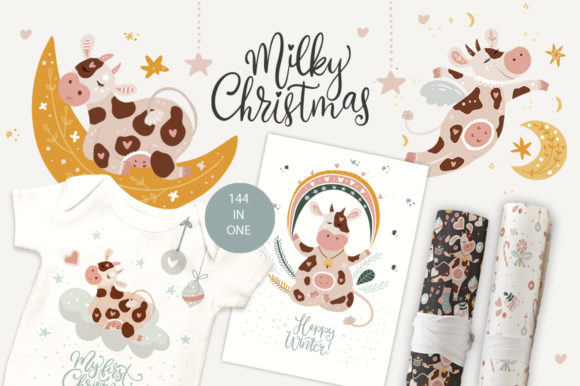
Milky Christmas. Christmas Cow Graphic is not merely a bundle of clip art. It is a structured system that includes 100 clip art illustrations, 15 digital papers, 13 hand-drawn lettering quotes, 8 ready pre-made posters, and 8 round pre-made prints. Every component is delivered in EPS, separate JPG, and PNG with transparent backgrounds, giving you maximum flexibility in how you use each element. The set centers on a charming Christmas cow graphic theme, bringing a playful, rustic warmth to winter designs. From a workflow perspective, this means you can move from concept to final output without constantly switching between disparate assets or rebuilding common elements from scratch.
Understanding What the Milky Christmas Toolkit Contains
Before integrating any new resource into your routine, it helps to know exactly what you are working with. The Milky Christmas. Christmas Cow Graphic set is organized into five distinct categories, each serving a specific role in the design process.
The 100 clip art illustrations are the backbone of the set. They include cows in holiday settings, winter motifs, ornaments, snowflakes, and other seasonal details. Because they come as separate PNG files with transparent backgrounds, you can drop them directly into any project without additional masking or editing. The EPS file gives you vector control if you need to scale or recolor elements for larger formats like banners or textile patterns.
The 15 digital papers provide ready-to-use backgrounds. They are useful for wrapping paper, packaging interiors, social media frames, or as texture layers behind text and graphics. Again, separate JPG and PNG files mean you can use them as-is or edit them further in your preferred software.
The 13 hand-drawn lettering quotes add a personal, crafted touch. These are not generic fonts but original hand-lettered phrases that fit the holiday theme. They work well on greeting cards, tags, and posters where you want a human feel rather than a mechanical typeface.
The 8 ready pre-made posters and 8 round pre-made prints are full compositions. They are particularly useful if you need a quick result—print them directly, use them as mockups, or modify them with your own text and branding. For a small business owner who needs a storefront sign or a social media graphic within the hour, these pre-made options are a practical shortcut.
Where Milky Christmas Fits in Your Creative Workflow
The real value of Milky Christmas. Christmas Cow Graphic becomes apparent when you map it against your own project timeline. Whether you are a freelance designer, a marketing manager, or a hobbyist creating holiday decorations at home, the set supports work before, during, and after the main design phase.
Before the Project: Planning and Preparation
When you are in the planning stage, you need to establish a visual direction quickly. Instead of sourcing inspiration from multiple places and then creating assets from scratch, you can open the Milky Christmas set and browse its illustrations, papers, and lettering. This gives you a concrete reference point for color palette, style, and mood. You can show client options, build mood boards, or sketch out layouts using the actual assets you will use later. This reduces the gap between planning and execution.
For example, if you are designing a line of holiday packaging for a small dairy brand, the cow graphic theme is already relevant. You can select three or four illustrations and a digital paper that matches the brand colors, then build your packaging concept around those choices. The preparation phase becomes less abstract and more grounded in real assets.
During the Project: Efficient Execution and Consistency
Once you move into production, the format choices in Milky Christmas. Christmas Cow Graphic directly affect your speed. The transparent PNG files let you layer elements instantly in any design software—Photoshop, Canva, Affinity, Illustrator, or even presentation tools like PowerPoint and Keynote. The EPS files give you vector flexibility for scaling without quality loss, which matters when the same cow illustration needs to appear on a tiny sticker and a large banner.
Having a unified set also enforces visual consistency. When all illustrations share the same line quality, color harmony, and level of detail, your final output looks cohesive even if you are working on multiple deliverables. This is especially important for marketers and small business owners who may not have a dedicated design team. Using assets from one source reduces the risk of mismatched styles that can make holiday campaigns feel disjointed.
Consider a workflow for creating a holiday product line: you can use the pre-made posters as the basis for online banners, the round prints for product labels, the digital papers for wrapping tissue, and the clip art for social media posts. Everything fits together because the assets were designed to work as a system.
After the Project: Archiving, Repurposing, and Long-Term Use
One often overlooked aspect of a good graphic set is its shelf life. Milky Christmas. Christmas Cow Graphic is not a one-use download. Because the files are organized and saved in versatile formats, you can archive them and reuse elements in future seasons. A cow illustration that worked on a 2024 holiday card can return in a 2025 newsletter, a seasonal website banner, or a year-round blog post about winter farm life. The transparent backgrounds and vector files ensure that the assets remain editable and scalable years later.
For educators and bloggers, this repurposing is valuable. A single set can cover multiple content cycles—December product launches, holiday gift guides, winter event promotions, and New Year sales. You are not buying a new set every time you need a different format. The investment in one comprehensive set pays for itself over repeated use.
Practical Implementation Tips for Different Users
How you integrate Milky Christmas. Christmas Cow Graphic into your routine depends on your role and output goals. Here are workflow-focused suggestions for common user types.
For Freelance Designers and Creative Professionals
- Use the EPS file as your master source. Keep the vector file open as a library. Drag individual illustrations into your working document as needed. This avoids opening multiple files and keeps your workspace organized.
- Build reusable templates. Take a pre-made poster or round print and replace the placeholder text with client-specific copy. Save these as template files for repeat clients or similar project types.
- Combine with your own photography. The cow illustrations work well as overlays on winter landscape photos. Use the PNG files with reduced opacity to create subtle background textures or foreground accents.
For Small Business Owners and Entrepreneurs
- Start with the pre-made items. If you need a storefront poster, a social media graphic, or a product tag quickly, use the ready-designed posters and round prints. Add your logo and business name using Canva or a similar tool. You can have a professional-looking output in under 30 minutes.
- Create a consistent brand for the holiday season. Select one or two cow illustrations and one digital paper as your seasonal brand elements. Use them across all customer touchpoints—email headers, Instagram posts, packaging, and in-store signs. Consistency builds recognition even during a short campaign.
- Prepare digital and physical versions simultaneously. Because you have both high-resolution JPG and transparent PNG files, you can send digital files to a printer for physical goods while also uploading the same designs to your online store. No need to re-export or reformat.
For Hobbyists, Bloggers, and Educators
- Use the hand-drawn lettering quotes as focal points. They are already designed and balanced. Place one quote on a digital paper background, and you have a finished greeting card or blog header. This is ideal if you are not comfortable with layout design.
- Make holiday worksheets or activity sheets. The clip art illustrations can be arranged into coloring pages, flashcards, or classroom decorations. The transparent backgrounds make it easy to composite multiple elements onto a single page.
- Keep files organized by type. Create folders for clip art, papers, lettering, posters, and prints. When you need a specific element, navigate to the correct folder instead of scrolling through one long list. This small habit saves time over multiple projects.
Compatibility and Tool Integration
Milky Christmas. Christmas Cow Graphic works with virtually any design or productivity tool that accepts EPS, JPG, or PNG files. This breadth is intentional—it allows you to use the set within the software you already trust rather than forcing you to learn a new platform.
- Adobe Creative Cloud users: The EPS files open directly in Illustrator, and the PNG files import cleanly into Photoshop and InDesign. You can also use the PNG files in Premiere Pro for video overlays.
- Canva and other browser-based tools: Upload the PNG files with transparent backgrounds directly. Canva supports them as stickers or elements that can be resized and layered.
- Print-on-demand services: When creating products for platforms like Printful, Redbubble, or Zazzle, the high-resolution JPG files provide the required quality for t-shirts, mugs, and phone cases. The transparent PNG files are useful for designs that need to sit on colored backgrounds.
- Office productivity software: PowerPoint and Word users can insert PNG files without worrying about white boxes around the illustrations. This is useful for internal presentations, flyers, or classroom materials.
This compatibility reduces friction. You do not need to convert files or install special software. The set meets you where you already work.
Quality Control and Long-Term Organization
Consistency across a holiday campaign or a product line depends not only on the assets themselves but also on how you manage them. Here are observations on maintaining quality and organization with Milky Christmas. Christmas Cow Graphic.
Check resolution early. Before using any illustration or paper in a large format, verify that the JPG resolution meets your printer's requirements. The EPS vector files are resolution-independent, but the JPG and PNG versions have a fixed pixel size. For banners or large posters, default to the EPS file and export your own high-resolution raster version.
Maintain a naming convention. The set comes with descriptive filenames, but you may want to add your own tags—such as "cow_santa_red" or "paper_plaid_green"—to speed up searches. If you manage a large library of design assets, consistent naming helps you find elements in seconds rather than minutes.
Backup your master files. The EPS file contains all 100 clip art illustrations in one document. If you customize any illustration—changing a color, adding a scarf, adjusting a pose—save a copy of that modified file separately. This way, you preserve both the original and your custom version for future use.
Create a usage guide for team members. If you work in a marketing department or with a small team, create a one-page reference sheet that shows which illustrations, papers, and lettering options are approved for the current campaign. This prevents different team members from using inconsistent styles and ensures every output looks like it belongs to the same family.
Adapting the Set for Different Holiday Scenarios
Not every holiday project has the same tone or audience. Milky Christmas. Christmas Cow Graphic leans into a rustic, playful, farm-inspired aesthetic that works well for family-oriented brands, organic products, cozy cafés, and children's content. You can adapt it to different contexts by changing how you combine the elements.
For a more elegant look, pair the simpler cow illustrations with a muted digital paper and a refined lettering quote. Avoid the busier clip art elements and focus on clean white space. For a playful, kid-friendly design, layer multiple cow illustrations, use bright digital papers, and combine with the round prints as stickers or badges. The range within the set allows you to scale the visual density up or down depending on the tone you need.
If you are designing for a commercial client who wants a winter theme without explicit Christmas references, the cow illustrations work in a general winter context. Snowflakes, barn scenes, and cozy farm motifs are seasonal without being exclusively tied to one holiday. This makes the set useful for January promotions, winter menus, and cold-weather product launches as well.
Making the Most of the Pre-Made Assets
The 8 ready pre-made posters and 8 round pre-made prints deserve special attention in a workflow context. These are not placeholder extras—they are fully composed designs that you can use as final output or as starting points for further customization.
If you are building a holiday collection for an online store, use the round prints as product badges or label designs. Upload them directly to your print-on-demand provider. For a pop-up shop or holiday market, print the posters as signs or backdrop decorations. The time saved by not designing these from scratch is significant, especially during the busy Q4 season when every hour matters.
For clients who need quick proof-of-concept mockups, the pre-made designs serve as visual references. You can show a client how their product might look with a holiday theme before investing time in custom artwork. If the client approves, you can refine the design further or use it as-is.
Final Observations on Integration and Value
Milky Christmas. Christmas Cow Graphic is a resource built for practical, repeated use. It supports the entire trajectory of a holiday project—from initial concept through final production and into future seasons. The variety of formats (EPS, JPG, PNG) and the range of asset types (illustrations, papers, lettering, posters, prints) mean you can handle most holiday design tasks without needing to source additional elements.
The set is particularly effective when you treat it as a system rather than a random collection. Choose your core illustrations early. Stick to a limited paper palette. Use the hand-drawn quotes consistently across media. By applying a small amount of creative discipline, you can produce a coordinated holiday campaign that looks intentional and professional, regardless of your design experience level.
For anyone who needs to produce holiday designs with efficiency, consistency, and a warm, memorable visual voice, Milky Christmas. Christmas Cow Graphic offers a practical shortcut. It does not replace your own creativity, but it removes a great deal of repetitive groundwork—leaving you more time to focus on the message, the audience, and the memories you are helping to create.