7 Ceramic Mug Mockups Bonus for Real-World Creative Projects
If you have ever tried to present a mug design to a client or list a product on a print-on-demand platform, you already know the challenge. A flat digital file rarely communicates how a design will look in someone’s hand. That is where the 7 Ceramic Mug Mockups Bonus enters the picture. This set gives you seven layered Photoshop files plus additional bonus images and PNGs, all designed to help you place your artwork onto realistic mugs without starting from scratch each time.
But let’s be clear about what this collection actually offers, and more importantly, where it fits into your workflow. The mockups are not built for edge-to-edge photo fills or repeating patterns. The smart objects are deliberately smaller than the full mug surface, which means your design stays within a defined area. That design choice works beautifully for logos, text, centered illustrations, and branded messages. It simply means you need to plan your artwork accordingly.
What You Actually Get Inside the Bonus Set
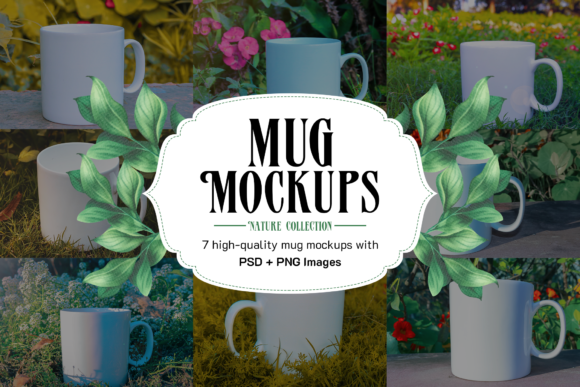
Before we talk about use cases, it helps to know exactly what lands in your download folder. The 7 Ceramic Mug Mockups Bonus includes seven high-quality PSD files, each with a smart object layer marked in red so you can spot it immediately. Alongside those files, you receive four bonus images and eleven high-resolution PNG images. The PNGs give you an instant option if you do not have Photoshop open or if you need a quick visual reference.
The editing process is straightforward. Open any PSD in Photoshop, locate the red-labeled smart object layer, and double-click it. A new tab opens where you paste or draw your design. Save that tab, close it, and your artwork appears on the mug in the main file. That is it. No masking, no complex layer blending, no manual perspective adjustments.
Where Small Business Owners and Entrepreneurs Get the Most Value
If you run a small business or an online store, product photography can eat up hours of your week. Renting studio equipment, staging props, and shooting multiple angles eats into time you could spend on customer service or marketing. The 7 Ceramic Mug Mockups Bonus lets you skip the shoot entirely for mug-based products. You can upload your logo or tagline into the smart object, save, and export a realistic product image for your website or Etsy listing.
Consider a local coffee shop that wants to sell branded mugs. Instead of ordering a batch, photographing them, and hoping the lighting looks right, the owner can mock up several color variations in one afternoon. The same applies to a candle maker who offers a limited-edition mug with each seasonal release. The mockups keep the presentation consistent while the design changes.
Practical Example: A Brand Launch with Multiple Mug Colors
Imagine you are launching a small batch of ceramic mugs for a newsletter community. You have three design variations: one with a bold logo, one with a short quote, and one with a simple line illustration. Using this bonus set, you open the PSD file, replace the smart object content three times, and save three distinct images. The background, lighting, and shadow remain identical across all three, which gives your product catalog a professional, cohesive look.
Why Freelance Designers and Creative Professionals Rely on Mockup Sets
Freelancers juggle multiple clients, each with different brand styles. When a client asks, “Can I see how this looks on an actual mug?” a quick mockup is often the difference between a signed contract and a stalled project. The 7 Ceramic Mug Mockups Bonus gives you seven different mug angles and styles, which means you can show the front view, a slightly angled look, or a stacked pair of mugs without rebuilding the scene.
Because the smart objects are not edge-to-edge, you can comfortably place typography-based designs or centered logos without worrying about the edges wrapping around the curve in an unnatural way. That limitation actually becomes a strength when your client wants a clean, readable message on the mug. You can also use the PNG files for quick client previews while you continue refining the PSD version.
Scenario: Presenting a Mug Design to a Local Nonprofit
A local nonprofit asks you to design a fundraising mug. They want their mission statement on one side and their logo on the other. With this mockup set, you place the text in the smart object, adjust the font size to fit within the safe zone, and present a realistic preview at the next board meeting. The board members see exactly how the final product will appear, which builds trust and reduces revision cycles.
How Marketers and Content Creators Use Mockups for Social Media and Email Campaigns
Marketing teams constantly need fresh visuals for social media posts, email headers, and blog images. A mug mockup offers a relatable, everyday object that audiences connect with easily. Instead of posting a flat graphic of a mug design, you can show the mug sitting on a wooden table or held in someone’s hand (using the bonus images). The 7 Ceramic Mug Mockups Bonus provides those staging elements without requiring you to hire a photographer.
Think about a holiday email campaign where you promote a limited-edition mug. You could use one PSD file to create a warm, cozy image for December and then reuse the same file with a different design for a summer promotion. The lighting and environment stay consistent, which helps your brand feel recognizable across seasons.
Real-World Situation: A Blogger Launching Merchandise
A lifestyle blogger with a modest following decides to sell mugs featuring their popular catchphrase. They have a small budget and no photography experience. The mockup set allows them to create a product image that looks like it belongs on a major retailer’s website. They download the files, open the smart object, type the catchphrase, save, and upload the image to their shop. Within an hour, they have a product page that looks credible.
Educators and Trainers Who Need Visual Aids for Workshops
If you teach design or e-commerce workshops, you need realistic examples that students can follow step by step. The 7 Ceramic Mug Mockups Bonus works well as a teaching tool because the smart object editing process is simple enough to demonstrate in a few minutes. You can walk students through opening the file, double-clicking the layer, inserting their own artwork, and seeing the update in real time.
The PNG files also serve as before-and-after examples. Show students the blank PNG, then the same angle with a completed design. This visual comparison helps them understand how mockups transform a flat design into a product preview. Because the set includes seven different angles, you can discuss how to choose the best perspective for different design types.
What to Consider Before Using These Mockups for Your Projects
The most important detail to keep in mind is that the smart objects are not designed edge to edge. That means if you try to place a full-bleed photo, a seamless pattern, or a sprawling illustration, parts of your design will be cut off or hidden. The mockups are built for centered artwork, typography, logos, and designs that fit within a defined rectangle.
This is not a flaw; it is a specific design choice that makes the mockups easy to use for the majority of real-world mug applications. Most branded mugs feature a logo or a short message rather than a full-surface pattern. If your project calls for a wrap-around design or a repeating pattern, you will need a different mockup set that supports edge-to-edge mapping.
Another practical consideration is that you need Photoshop to edit the smart objects. If you work exclusively in browser-based design tools or free software that does not support PSD smart objects, you will need to rely on the included PNG files or convert the PSDs in a compatible program. The PNGs are high quality and usable on their own, but they do not allow you to swap the design dynamically.
Storage and File Management Tips
The download includes seven PSD files, four bonus images, and eleven PNGs. That is a manageable number of files, but you will want to keep them organized. Create a folder on your computer or cloud drive specifically for this mockup set. Label each file by mug angle or perspective so you can quickly find the right one later. If you use the same mockup repeatedly for different designs, consider saving each finished version as a separate PSD or exported JPG to avoid overwriting your work.
Why This Set Works for Hobbyists and Everyday Users Too
Not everyone who downloads mockups is running a business. Hobbyists, crafters, and people who enjoy making personalized gifts also benefit from the 7 Ceramic Mug Mockups Bonus. If you want to create a custom mug for a friend’s birthday or a family reunion, the mockup lets you see how the final product will look before you order a physical prototype.
You can experiment with different font styles, colors, and placements without wasting money on test prints. Once you settle on a design, you can send the mockup image to a print-on-demand service or a local print shop as a reference. The service provider knows exactly where to place the design because the mockup simulates the final product accurately.
Connecting Features to Real Outcomes
Let’s revisit the key features and attach them to actual outcomes rather than listing them mechanically.
- Seven high-quality PSD files with smart object layers – You get multiple mug angles and layouts, which means you can present a design from the front, side, or stacked view without creating each scene individually.
- Four bonus images – These give you ready-to-use backgrounds and environments, so you do not need to source additional textures or props.
- Eleven high-quality PNG images – You can use these for quick social media posts, client proofs, or as placeholders while you refine the PSD version.
- Smart objects marked in red – This visual cue reduces confusion, especially if you are new to Photoshop or you are working with layered files under a deadline.
- Simple editing workflow – Double-click, paste, save, close. That is the entire process. You can update a design in under a minute once you have the file open.
These features matter because they save you time, reduce the learning curve, and produce consistent results across multiple designs. If you have ever spent hours trying to create a realistic mug preview from scratch, you will appreciate how much this set streamlines the process.
Final Thoughts on the 7 Ceramic Mug Mockups Bonus
The 7 Ceramic Mug Mockups Bonus is not a magic solution that handles every type of mug design. It is a focused tool for a common need: showing a centered design on a realistic ceramic mug. Whether you are a small business owner, a freelance designer, a marketer, an educator, or a hobbyist, the set gives you a reliable starting point. The smart object workflow is approachable even for people who do not use Photoshop daily, and the PNG files ensure you have something usable regardless of your software setup.
When you use these mockups, remember the edge-to-edge limitation and plan your artwork accordingly. Keep your design elements within the safe area of the smart object, and you will get clean, professional results every time. The real value here is not in the number of files but in the hours you reclaim by not building product visuals from scratch.
Take a few minutes to explore each mug angle in the set. Try placing a simple logo, a short phrase, and a small illustration in different files. You will quickly see which angles work best for your specific style. Once you find your preferred layout, you can reuse it across multiple projects with minor updates. That kind of efficiency is what makes a mockup set worth keeping in your creative toolbox.