Dia De Los Muertos Clipart Collection: A Practical Resource for Creative Projects
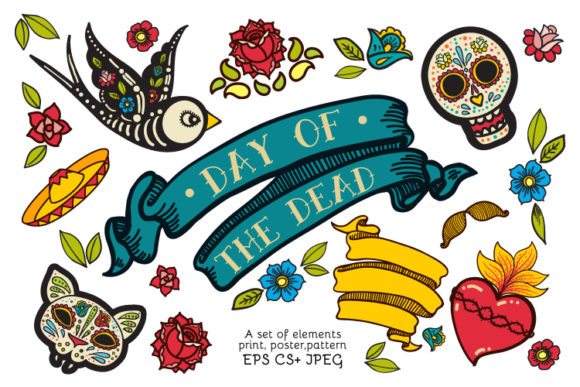
When you are building visual content around cultural celebrations, the right graphic assets can determine whether a project lands or falls flat. The Dia De Los Muertos Clipart Collection offers a focused set of illustrations, posters, and seamless patterns built around the iconic imagery of Day of the Dead. This is not a generic bundle of random clipart. It is a curated library of sugar skulls, flowers, birds, ribbon banners, and poster designs that work together visually, so you can maintain consistency across print, digital, and product applications.
For anyone producing t-shirt graphics, scrapbook pages, party decorations, fabric prints, or packaging, having a single source of cohesive vector and raster files simplifies planning and execution. This collection provides 36 EPS 10 files, 36 SVG files, 36 JPEG files, and 36 PNG files, which means you can move between design software, print platforms, and web publishing without reformatting every element from scratch.
What the Dia De Los Muertos Clipart Collection Actually Contains
Before integrating any resource into a workflow, it helps to know exactly what you are working with. This collection includes:
- Illustrations of sugar skulls, cats, birds, and floral motifs
- Ribbon banners and poster templates
- Seamless patterns suitable for fabric wrapping paper and surface design
- Decor elements for holiday and festival applications
Each design is supplied in four formats. EPS 10 files work well for professional vector editing in Adobe Illustrator CorelDRAW or Affinity Designer. SVG files are compatible with web platforms Cricut Silhouette and other cutting machine software. JPEG and PNG versions allow for quick use in mockups social media graphics and document layouts where vector editing is not required.
This format variety is the primary advantage. You do not need to convert files or redraw elements for different outputs. The same sugar skull illustration can be printed on a shirt scaled for a poster background and placed on a website without quality loss, provided you select the correct file type for each destination.
Where This Collection Fits in a Creative Workflow
Creative workflows generally fall into three phases: preparation, production, and finishing. The Dia De Los Muertos Clipart Collection serves all three, but the way you use it depends on where you are in the process.
Before the Project: Planning and Concept Development
If you are designing a series of products for an upcoming Día de los Muertos event or a seasonal product line, early access to vector assets lets you test layouts and color schemes without creating original illustrations from scratch. Import the EPS files into your design software and use them as placeholders or starting points. You can adjust the scale reposition elements or combine motifs to explore composition before committing to final production.
For example, if you are a small business owner planning a limited run of tote bags and t-shirts, you can take the seamless pattern files, apply them to product mockups, and evaluate how the design reads at actual size. This reduces the time spent on speculative drawing and lets you validate concepts with prototypes or client approvals sooner.
Bloggers and content creators can use the JPEG or PNG versions to draft social media posts, email headers, or website banners before the final design is locked. Because the collection includes poster layouts and ribbon banners, you can build thematic visuals for announcements countdowns or event promotion without hiring a designer for every graphic.
During the Project: Production and Asset Management
Once you move into the production phase, file organization becomes critical. With 144 files total across four formats, having a structured approach prevents wasted time searching for the right version.
- Create separate folders for EPS SVG JPEG and PNG.
- Rename files using a consistent convention that includes the motif and format, such as skull_floral.eps or bird_banner.png.
- Keep the working vector files in a project folder and export copies for each output channel.
If you are using the collection for t-shirt prints, vector files are your primary resource. EPS 10 files retain crisp edges and allow you to isolate elements, change colors, or remove backgrounds without losing resolution. SVG files work directly with heat press software and cutting machines, which means you can skip the step of converting from a raster image.
For scrapbooking and paper crafts, the JPEG and PNG versions offer immediate compatibility with home printers and design apps like Canva or Photoshop Elements. The PNG files with transparent backgrounds are especially useful when layering images over patterned paper or textured backgrounds, because you avoid the white box that comes with JPEG files.
Educators and workshop leaders can use the collection to build handouts, worksheets, or classroom decorations. The themed illustrations provide culturally relevant visuals without requiring the instructor to create original art. You can assemble activity sheets that include sugar skull outlines for coloring, or use the flower motifs to create borders and headers for lesson materials.
After the Project: Archiving and Reuse
One of the overlooked aspects of buying a clipart collection is its long-term value. The Dia De Los Muertos Clipart Collection is not a one-use resource. Because the designs are vector based, you can archive the EPS files and revisit them next season. Colors can be updated, elements can be rearranged, and patterns can be rotated for fresh applications.
If you maintain a library of past projects, store the collection in a master assets folder rather than inside individual project folders. That way, when you need a sugar skull illustration or a bird motif next year, you pull from the same source. This consistency builds a recognizable visual style across your products or content over time.
Practical Implementation Tips for Different Outputs
The collection is described as ideal for t-shirt prints, decals, scrapbooking, postcards, wall decor, bags, fabrics, wrapping paper, packaging, and festival decorations. Each output has specific file requirements and preparation steps.
T-shirt prints and decals
Use the SVG format for direct upload to print-on-demand platforms or cutting machine software. Ensure your design is sized to the print area and that colors are separated if you are using screen printing. For decals, the transparent PNG files work for small runs printed on vinyl, but vector files give better results for professional production because they scale without pixelation.
Fabric and wrapping paper
The seamless patterns in the collection are the primary resource here. Test the repeat by applying the pattern to a square swatch in your design software. If the pattern does not align perfectly, adjust the tile boundaries in your vector editor before printing bulk yardage or rolls. For surface pattern design, EPS files allow you to modify the scale of the repeat, which is useful when moving from fabric to paper to packaging, where density preferences differ.
Postcards and wall decor
Posters and postcards require high resolution for print. Use the JPEG files at 300 DPI and check that the dimensions match your output size. If you need to enlarge an element, pull the vector EPS file, scale the element, and export a fresh high-resolution raster. This avoids the softness that comes from upscaling a low-resolution JPEG.
Holiday and festival decorations
When producing banners, table centerpieces, or hanging decorations, consider mixing the ribbon banners with the flower and skull motifs. The collection includes poster templates that can be printed at home or at a local print shop. For large format signage, always start from the EPS file and convert to the required dimensions before exporting a raster version.
Compatibility with Common Design Tools
Understanding how the collection interacts with your existing software stack saves time during production. EPS 10 files open in almost all professional vector applications. If you use Canva, the SVG files are your best option because they can be uploaded as elements and scaled freely. Adobe Photoshop users will work primarily with the PNG files for layered compositions, relying on the transparent backgrounds to blend elements.
For users who design with Cricut Design Space or Silhouette Studio, SVG files are the standard. Import the bird or flower SVGs directly, resize them to fit your mat, and proceed with cutting. Because the collection includes 36 SVGs, you have a broad selection of motifs to combine in a single project without opening multiple file sources.
If you are a freelance designer or marketer managing multiple clients, the collection serves as a base that can be customized per brand. Change the color palette of an EPS file to match a client's brand guidelines, then export the results in whatever format the client needs. This reduces the time per project while maintaining visual quality.
Organization for Long-Term Use
A clipart collection is only as useful as your ability to find the right file when you need it. Spend ten minutes setting up a folder structure that matches how you work:
- By format: EPS, SVG, JPEG, PNG
- By motif: sugar skulls, birds, flowers, banners, posters, patterns
- By use case: print, web, merch, fabric
You can also tag files in your digital asset management system or operating system tags if you work across teams. For solo creators, a simple naming convention with descriptive keywords works. For example, cat_floral_orange.eps tells you the subject, color, and format in one glance.
When you archive the collection after initial use, keep the original zip file or folder untouched. Copy the files you need into each project folder. This preserves the baseline assets if you need to revisit them without overwriting customized versions.
Observations on Quality and Consistency
Collections like this one are most effective when the illustration style is consistent across all files. The Dia De Los Muertos Clipart Collection uses a cohesive visual language, which means you can combine a sugar skull illustration with a bird motif and a ribbon banner without visual conflict. This is especially important for small business owners who may not have design training and need to assemble product mockups or packaging layouts quickly.
Consistency also matters for branding. If you are building a seasonal product line around Día de los Muertos, using one unified collection ensures that the t-shirt design matches the bag pattern and the wrapping paper. Customers recognize a coherent aesthetic, whether they see it online, in a store, or on social media.
The inclusion of both vector and raster formats indicates that the collection was built for production flexibility. Not every user works in Illustrator or Affinity. Some rely on web-based tools or mobile apps. By supplying JPEG and PNG alongside EPS and SVG, the collection accommodates the widest possible range of workflows.
Making the Collection Work for Your Specific Process
If you are a productivity minded creator, treat the collection as a component library rather than finished art. Extract individual elements from EPS files, regroup them, and build your own compositions. The sugar skulls can be isolated and scaled to different sizes. The flowers can be rotated and layered to create new patterns. This approach gives you the speed of using pre-made assets with the uniqueness of custom arrangements.
For entrepreneurs launching a limited edition product run, the collection reduces the upfront design cost. Instead of commissioning original illustrations for each product, you adapt the existing files to your chosen surface. The savings can be redirected to sampling, packaging, or marketing.
Publishers and bloggers can schedule content around the collection's motifs. A month before Día de los Muertos, produce a series of posts featuring different elements: one week on sugar skulls, the next on floral patterns, followed by banner and poster designs. Each post can include download links or affiliate references, creating a content cadence that matches audience interest over time.
Ultimately, the value of the Dia De Los Muertos Clipart Collection lies in its format coverage and thematic focus. Whether you are printing fabric, cutting vinyl, designing social graphics, or producing festival decor, the files are ready to integrate with minimal friction. The planning happens before you open the first file: know your output, select the right format, and organize your assets so the work flows from concept to finished product without unnecessary detours.