Floral Jewelry Display SVG File, Mod.2: A Practical Guide for Digital Crafters
If you work with a cutting machine like a Silhouette Cameo or Cricut, you know how valuable a well-designed SVG file can be. The Floral Jewelry Display SVG File, Mod.2 offers a decorative way to present rings, earrings, bracelets, or other small accessories, but it also raises questions about whether a digital-only format fits your workflow, your tools, and your project goals. This article walks through what this specific display file offers, how it compares with other display options, and the tradeoffs you should consider before downloading.
What Is the Floral Jewelry Display SVG File, Mod.2?
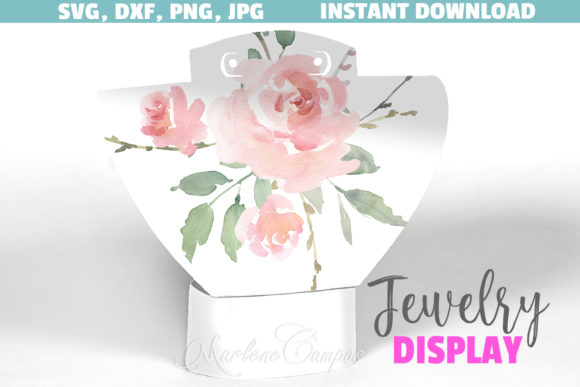
This is a digital crafting template designed for cutting machines and print-and-cut projects. The display itself measures approximately 14.7 x 18 cm (5.8 x 7.11 inches), which is a compact size suitable for countertop displays, craft fairs, or gift packaging. The design features a blush floral motif, making it a visually soft and feminine option for showcasing jewelry.
Because this is a digital product, you receive a ZIP file containing multiple formats: one SVG file, one DXF file, two PNG display patterns, one JPG version ready for print on a 12x12 sheet, and an instructions PDF. This variety means you can use the file with Silhouette Studio, Cricut Design Space, or even general editing programs like Photoshop, Illustrator, or PowerPoint. The PNG files are particularly helpful if your cutting software struggles with SVG or DXF—you can trace the cutting lines directly from them.
What makes Mod.2 distinct from other jewelry display templates is its specific floral layout and blush color palette. It is not a generic stand or a plain geometric holder; it is designed with a decorative, nature-inspired aesthetic that may appeal to sellers of vintage, romantic, or botanical-themed jewelry collections.
Comparing Digital Display Templates with Physical Displays
When you evaluate the Floral Jewelry Display SVG File, Mod.2, it helps to place it alongside the broader category of jewelry display options. Physical displays—acrylic risers, velvet trays, wooden stands—offer a ready-to-use solution. You order them, they ship, and you place them on a table. No cutting, no assembly, no software required.
However, physical displays come with limitations. They are heavier to ship, more expensive to buy in bulk, and fixed in their design. If you change your branding or want a seasonal floral motif, you need to purchase new ones. Digital templates like Mod.2 give you creative control. You can resize the display, recolor the floral pattern, or test different paper stocks before committing to a final run. The tradeoff is that you must own a cutting machine and have enough skill to handle SVG files, adjust cut settings, and troubleshoot alignment issues.
For crafters who already own a Silhouette or Cricut and regularly make other paper crafts, the learning curve is minimal. For someone new to digital cutting, the instructions PDF is a helpful starting point, but you may still need to experiment with blade depth, pressure, and material type to get clean cuts on cardstock or lightweight chipboard.
Strengths of the Floral Jewelry Display SVG File, Mod.2
One clear strength is format versatility. The ZIP file includes SVG, DXF, PNG, and JPG, which covers almost every cutting machine on the market. Whether you use a Cricut Maker, a Silhouette Cameo 4, a Brother ScanNCut, or even a laser cutter that accepts DXF, you have a compatible file. This reduces friction for users who may have upgraded their machine or who share files across different devices.
Another strength is the design itself. The blush floral pattern is pre-colored in the JPG and PNG files, so if you want a quick print-and-cut project, you can load a 12x12 sheet of cardstock into your printer and let the machine do the cutting. This saves time compared to hand-drawing or hand-painting floral details. The size is also practical—large enough to hold several pairs of earrings or a few rings, but small enough to fit inside a gift box or on a small retail table.
The digital nature means you can produce exactly as many displays as you need. If you are testing a new product line at a weekend market, you might print five displays. If an order spikes, you can print twenty more within an hour, assuming you have the paper and ink. There is no minimum order quantity and no waiting for restocking.
Limitations and Realistic Tradeoffs
While the Floral Jewelry Display SVG File, Mod.2 offers many benefits, it is not a universal solution. The most obvious limitation is that you need a cutting machine and the knowledge to operate it. The product description clearly states that no physical item will be shipped, and you must be comfortable with software like Silhouette Studio or Cricut Design Space. If you do not own a cutting machine, this file will not help you directly—you would need to find a friend with a machine or a local maker space to cut it for you.
Material choice also matters. The design works best on medium-weight cardstock or thin chipboard. If you use flimsy paper, the display may not stand upright or support the weight of metal jewelry. If you use thick material like 2mm chipboard, you may need to adjust blade settings and possibly do multiple passes. The instructions PDF includes guidance, but every machine and material combination behaves differently, so expect some experimentation.
Another consideration is the aesthetic fit. The blush floral style is lovely for romantic, vintage, or feminine jewelry lines. However, if your brand uses a modern minimalist look, bold colors, or an industrial theme, this particular design may clash. In that case, you might prefer a simpler geometric display or a template you can customize with your own colors. The PNG and JPG files can be recolored in Photoshop or Illustrator, but that adds an extra step and requires access to those programs.
When This Display File Is the Right Choice
The Floral Jewelry Display SVG File, Mod.2 is a strong option when you need a small batch of visually appealing displays quickly and cost-effectively. It works well for:
- Crafters who already own a cutting machine and regularly use SVG files.
- Small-scale jewelry sellers who want a consistent, branded look without ordering mass-produced displays.
- Gift makers who want to present handmade jewelry in a coordinated, floral-themed package.
- Anyone testing a new product line and needing flexible quantities without upfront inventory costs.
If these describe your situation, the digital format gives you freedom that physical displays cannot match. You can print one display to photograph for an online listing, then scale up production as orders come in. The 12x12 JPG sheet is especially convenient for quick turnaround, and the separate SVG file gives you control over cut lines if you want to tweak the design.
When You May Need an Alternative
Conversely, there are scenarios where this file may not be the best fit. If you do not own a cutting machine, or if you are not comfortable troubleshooting cut settings, a physical display stand may save you time and frustration. Similarly, if your jewelry is heavy—such as large metal cuffs or stone pendants—a paper-based display may not provide enough structural support. In that case, you might consider a wooden or acrylic stand designed for heavier items.
If your brand colors are far from blush pink and floral patterns, you might find the design limiting. While you can recolor the JPG file in an editor, the built-in floral illustration is fixed. A different template with a more neutral or customizable pattern could be a better match. Some digital designers offer SVG displays with interchangeable decorative layers, which give you more flexibility to swap out motifs seasonally.
Another scenario is when you need displays in very large quantities. If you plan to sell at multiple shows or wholesale to retailers, printing and cutting each display yourself becomes time-consuming. In that case, ordering printed and pre-cut displays from a commercial printer, or purchasing physical displays in bulk, may lower your per-unit effort even if the upfront cost is higher.
Practical Tips for Getting the Most Out of This File
If you decide to go ahead with the Floral Jewelry Display SVG File, Mod.2, a few practical steps can improve your results. First, test the file on scrap cardstock before using your best paper. This lets you verify that your machine reads the cut lines correctly and that the display pieces fit together as intended. The instructions PDF should show you how the tabs and slots align, but a dry run helps catch issues early.
Second, consider the paper weight. A 65 lb or 80 lb cardstock is a good starting point for small earrings and rings. For slightly heavier jewelry, look for 100 lb cardstock or a thin chipboard. If your machine struggles, try a light grip mat and a fine-point blade. For thicker materials, a deep-point blade or a knife blade may be necessary. Adjusting the cut pressure and number of passes can also make a difference.
Third, keep the file formats organized. When you unzip the folder, save the SVG for cutting, the PNG for tracing if needed, and the JPG for quick print-and-cut projects. Having all three means you can switch workflows depending on whether you want to print in color or cut from colored cardstock. The DXF file is useful if you use a Brother machine or want to import the design into other design software.
Final Considerations for Your Decision
Choosing a jewelry display format ultimately comes down to your tools, your time, and your brand identity. The Floral Jewelry Display SVG File, Mod.2 is a well-structured digital template that gives you creative control and production flexibility. It is not a one-size-fits-all solution, but for crafters who already work with cutting machines and who appreciate a floral, blush aesthetic, it offers a practical and attractive way to present jewelry without ordering physical inventory.
Take a moment to assess your current setup: Do you have a reliable cutting machine? Are you comfortable with SVG files? Does the design align with your jewelry collection's look? If yes, this file can save you money and space while giving you a professional-looking display that you can reproduce on demand. If not, consider whether your time is better spent on a physical display or a different digital template that better matches your style and material needs.
No matter which path you choose, understanding the tradeoffs between digital and physical display options will help you make a decision that supports your craft business or personal projects without unnecessary waste or expense.