Halloween Vector Shapes Collection: The Ultimate Resource for Spooky and Cute Character Design
Halloween is a time of year that sparks creativity across industries—from party planners and home decorators to graphic designers and small business owners. One of the most versatile resources available for crafting Halloween-themed visuals is a comprehensive Halloween Vector Shapes Collection. These collections typically include a wide range of characters and items in scalable vector formats, making them ideal for everything from digital marketing to physical merchandise. In this article, we will explore what these collections contain, why they are valuable, how they fit into modern creative workflows, and how you can use them effectively—whether you are a seasoned designer or a complete beginner.
What Is a Halloween Vector Shapes Collection?
A Halloween Vector Shapes Collection is a curated set of digital illustrations—typically including both cute and spooky characters and thematic items—saved in vector formats such as AI, EPS, and Photoshop PSD, often accompanied by transparent PNG files. Unlike raster images, vectors are mathematically defined, meaning they can be scaled infinitely without losing quality. This makes them indispensable for projects that require flexibility in size, such as billboards, business cards, or social media graphics.
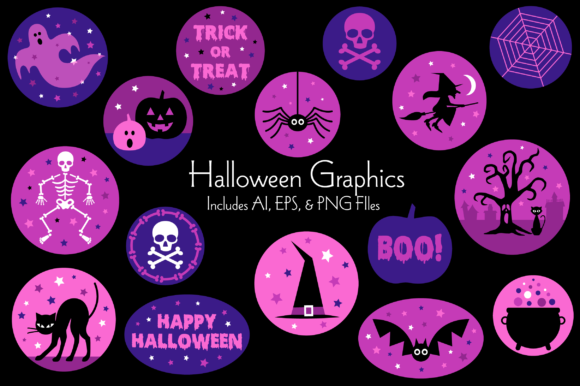
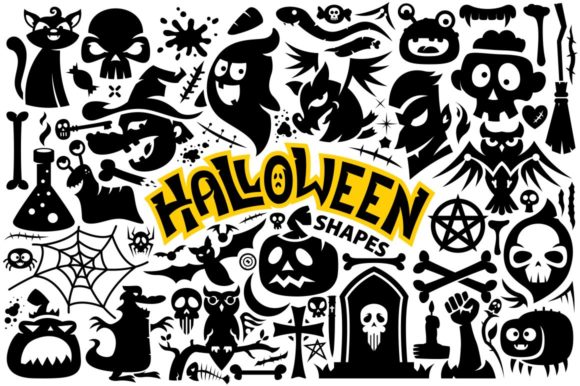
These collections usually feature a broad ensemble of Halloween icons and characters: bats, blood splashes, bones, brooms, candles, candies, black cats, crosses, death motifs, decorations, fish skeletons, ghosts, hands, hearts, keys, monsters, moons, owls, scars, skulls, snakes, spiders, spider webs, splashes, stars, teeth, tombstones, vampires, vampire stakes, witches, zombies, and many more. The variety ensures that you have everything needed to build a cohesive Halloween theme without sourcing multiple assets from different places.
Why Vector Format Matters for Halloween Design
When you work with a set of Halloween characters and items in vector format, you gain several practical advantages. First and foremost is scalability. A vector spider web, for example, can be enlarged to cover a full poster or shrunk to fit a tiny sticker, and it will remain crisp and clear every time. This is critical when designing for multiple platforms—web, print, apparel, or signage—because you cannot always predict the final output size.
Another major benefit is editability. Vector files in AI or EPS format allow you to change colors, resize individual elements, modify shapes, and even combine characters to create entirely new compositions. If you want a purple ghost instead of a white one, or a green witch hat with orange stars, you can make those changes in seconds inside Adobe Illustrator or another vector editor. This flexibility saves hours of manual rework and gives you complete creative control.
Additionally, the inclusion of Photoshop PSD Transparent PNG formats makes these assets accessible to users who prefer working in raster environments. The transparent PNG versions are ready to drag and drop into any design software without background cleanup, making them ideal for quick mock-ups or social media posts.
Exploring the Halloween Characters and Items Collection
Let’s take a closer look at the types of elements you can expect in a typical Halloween Vector Shapes Collection. These are usually grouped into categories that balance spooky and cute aesthetics, ensuring broad appeal for both children’s parties and more mature horror-themed events.
Cute Characters and Classic Icons
Cute characters are often the star of the show for family-friendly Halloween materials. Think of a smiling ghost with rosy cheeks, a friendly black cat with big eyes, a candy corn character, or a witch riding a broom with a cheerful grin. These elements help lower the intimidation factor of Halloween and make the holiday accessible to younger audiences or more conservative brands.
On the other side, classic spooky icons like skulls, tombstones, bats, spider webs, and vampire stakes provide the traditional Halloween atmosphere. These items are perfect for haunted house promotions, horror-themed events, or any project that aims for a chilling vibe. The inclusion of both cute and scary elements in one collection means you can mix and match to create exactly the mood you want.
Less Common but Highly Useful Items
Some collections go beyond the usual suspects and include items like fish skeletons, scars, splashes, teeth, and hearts. A fish skeleton might seem niche, but it fits perfectly into underwater Halloween themes or pirate-horror combinations. Scars and splashes add gory accents for more intense horror designs. Hearts and keys can symbolize love, mystery, or unlocking secrets—adding narrative depth to your visuals. The breadth of the collection reduces the need to purchase multiple asset packs, saving both time and money.
Bonus Seamless Vector Patterns: A Game Changer
One of the standout additions in many premium Halloween vector collections is the inclusion of 3 Seamless Vector Patterns in AI, EPS, and PNG formats (sized at 1024px and 512px). Seamless patterns are repeating backgrounds that tile perfectly without visible seams. They can be used for wrapping paper, fabric prints, website backgrounds, PowerPoint slides, or even as a texture in 3D rendering.
Having these patterns included means you don’t need to spend extra time creating tiles from individual characters. The pattern files are ready to use, and because they are vector-based, you can modify the colors, scale, or rotation to match your project’s palette. The PNG versions give you a quick preview option for presentations or small-scale use. This is especially useful for small business owners or event planners who need to produce cohesive branding quickly—think matching banners, tablecloths, and party invites.
How Halloween Vector Assets Fit into Modern Life and Work
Halloween-themed design is no longer limited to October. Businesses use seasonal imagery year-round for themed promotions, product launches, or social media engagement. A Halloween Vector Shapes Collection can serve as a creative resource for:
- Marketing campaigns: Create eye-catching ads, email headers, and social media posts that stand out in crowded feeds.
- Merchandise design: Use characters and icons for T-shirts, mugs, stickers, tote bags, and other print-on-demand products.
- Event planning: Design invitations, flyers, menus, and decorations for Halloween parties, trunk-or-treat events, or school festivals.
- Educational materials: Teachers and parents can create fun worksheets, coloring pages, or classroom displays featuring friendly Halloween characters.
- Digital content creation: YouTubers, streamers, and bloggers can build custom overlays, thumbnails, and banners with a cohesive spooky theme.
Because the files come in multiple formats (AI, EPS, PSD, and transparent PNG), they work across platforms—whether you are designing in Adobe Creative Suite, Affinity Designer, Canva, or even Microsoft Office. This versatility lowers the barrier to entry for non-designers, who can simply use the PNG files in drag-and-drop tools without worrying about layer complexity.
Common Misunderstandings About Vector vs. Raster
Many beginners assume that all images are essentially the same, but understanding the difference between vector and raster graphics can dramatically improve your design outcomes. Raster images (like JPEGs or standard PNGs) are made of pixels and lose quality when enlarged. Vector images (AI, EPS, SVG) are built from points, lines, and curves, so they stay sharp at any size.
When you purchase a Halloween Vector Shapes Collection, you are paying for the ability to scale elements freely. A common mistake is to open a vector file in a basic image viewer and assume it is broken because it looks different. Instead, you need to use vector-editing software (Adobe Illustrator, Inkscape, or CorelDRAW) to unlock the full potential. Similarly, the transparent PNG files included in the collection are rasterized versions—ideal for quick use but not infinitely scalable. Knowing when to use which format is key to getting the most out of your assets.
Another misconception is that vector graphics lack detail compared to raster. While vectors are generally better suited for flat illustrations and icons, modern vector tools allow for gradients, shadows, and complex textures that can rival photographic quality. The Halloween characters in these collections are designed to be detailed enough to look professional while remaining simple enough for quick editing.
Practical Tips for Using Halloween Vector Shapes in Your Projects
If you are new to working with vector collections, here are a few actionable tips to help you get started:
- Organize your files: Most collections come with clearly named folders. Keep the AI, EPS, PSD, and PNG files separated. Create a project folder and copy only the assets you plan to use.
- Use symbols and layers: In Adobe Illustrator, open the AI file and look for layers. You can hide, lock, or rearrange elements to build compositions. Create symbols for elements you will reuse (like a bat or a spider) to keep file sizes manageable.
- Customize colors: Use the direct selection tool to change the color of individual shapes. This is perfect for matching brand guidelines or creating a unique color scheme for your event.
- Combine characters with patterns: Use a seamless pattern as a background and place characters (ghosts, witches, pumpkins) on top. This creates a rich, layered design with minimal effort.
- Export for specific uses: Save your final design as a PNG for web use, or as a PDF for print. If you need to keep vector properties, export as SVG or EPS.
Where to Find Quality Halloween Vector Collections
Premium collections are available from graphic design marketplaces like Creative Market, Envato Elements, and Design Cuts, as well as directly from independent designers. When choosing a collection, look for one that offers AI, EPS, Photoshop PSD, and transparent PNG formats, plus bonus content like seamless patterns. Read the license terms carefully—some collections allow commercial use, while others restrict resale or require attribution. A good collection will also include a preview PDF or image to help you quickly see what is included without opening every file.
The best collections, like the one described in this article, give you both breadth (many character and item types) and depth (multiple formats and bonuses). This ensures you have everything on hand to execute any Halloween vision, from the sweet and whimsical to the dark and terrifying.
Final Thoughts: Elevate Your Halloween Design with Vector Assets
Whether you are designing for a business, a community event, or personal creative projects, a Halloween Vector Shapes Collection is an investment in efficiency and quality. The combination of cute characters and classic spooky items—bats, blood, bones, broom, candle, candy, cat, cross, death, decorations, fish skeleton, ghost, hand, heart, key, monster, moon, owl, scars, skull, snake, spider, web, splash, star, teeth, tombstone, vampire, vampire stake, witch, zombie—covers nearly every visual need you might have. The inclusion of vector formats (AI, EPS), Photoshop PSD, and transparent PNG files ensures compatibility with all major design workflows. And the bonus seamless patterns give you an extra edge for background design.
By understanding how to use these assets—scaling without loss, editing colors, mixing elements, and applying patterns—you can produce professional results quickly, even if you are not a trained designer. Halloween is a season of imagination and transformation, and having the right tools makes it easier to bring your creative visions to life. Explore the possibilities, experiment with the characters, and enjoy the process of building something uniquely spooky and fun.