Happy Halloween Trick or Treat SVG: A Versatile Cut File for Your Seasonal DIY Projects
When Halloween approaches, many crafters begin searching for design assets that can adapt across multiple projects. The Happy Halloween Trick or Treat SVG digital download has become a go-to resource for DIY enthusiasts who want consistent, professional-looking artwork for decorations, apparel, and gifts. But is this particular SVG bundle the right fit for your next project? Understanding what it offers, how it compares to other design formats, and where its strengths and limitations lie can help you decide before you download.
What the Happy Halloween Trick or Treat SVG Bundle Includes
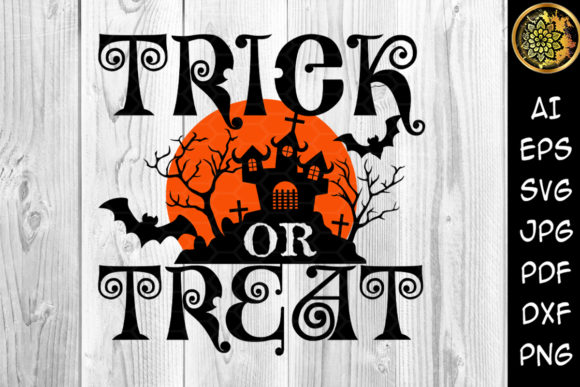
This digital download provides a single graphic—the phrase "Happy Halloween Trick or Treat" rendered in a decorative style—but it arrives in seven file formats. You receive an AI file, EPS file, DXF file, PDF file, SVG file, JPEG file, and a PNG file with a transparent background. The design itself is delivered in black, though the color can be changed easily in most editing software or cutting machine programs. The files are packaged in a single ZIP archive, making download and organization straightforward.
What distinguishes this bundle from a simple SVG file is the range of formats. SVG is the most commonly used format for cutting machines like Cricut and Silhouette, but having AI and EPS files gives Adobe Illustrator users more flexibility for editing. The DXF format can be useful for certain CAD-style cutting workflows, and the PNG with transparency allows for quick digital mockups or print-on-demand previews without needing to open vector software. For someone who works across multiple programs or who shares files with other crafters, this format variety reduces friction.
How This Design Compares to Other Halloween SVG Options
Not all Halloween SVG bundles are equal, and understanding the differences can help you choose wisely. Many free or inexpensive SVG files online come in only one format—typically SVG alone—or include a low-resolution PNG. This bundle covers a broader range, which can be important if you switch between cutting machines, print software, and design tools. For example, if you own a Silhouette Cameo but also want to create a digital mockup in Canva, having both the SVG and the transparent PNG saves time.
Another point of comparison is the design style. Some Halloween SVGs are highly detailed with layered elements, shadows, or intricate outlines. Others, like this one, appear to be a clean, single-layer text design. Single-layer designs are generally easier to weed and apply for vinyl projects, especially for beginners. Multi-layer designs can produce stunning results but require more precision and time. If you prioritize speed and simplicity, a straightforward text-based cut file may serve you better. If you want elaborate scenes with haunted houses or multi-color motifs, a more complex design might be needed.
The color delivery matters too. Receiving the design in black is neutral and editable, but some users prefer pre-colored options. Black works well for most dark or light materials, but if you are layering the design on a dark background, you would need to recolor it to a lighter shade in your software. This is a minor step, but it is worth noting if you prefer an off-white or metallic finish straight from the download.
Strengths of This Digital Download for Common DIY Projects
The Happy Halloween Trick or Treat SVG is well-suited for several popular project categories, and its format variety makes it more adaptable than many single-format options.
Vinyl Decals and Signs
For indoor or outdoor Halloween signs, cutting vinyl from an SVG file is a typical workflow. The single-layer text design weeds quickly, and the clean lettering reads clearly from a distance. You can apply it to a painted wood board, a metal bucket, or a glass jar. Because black is the base color, you can easily change it to orange, purple, green, or white depending on your surface. If you plan to sell finished signs, having a professional-looking phrase like "Happy Halloween Trick or Treat" is more versatile than a niche pun that might only appeal to a smaller audience.
Personalized Apparel and T-Shirts
Heat transfer vinyl is another common use. The SVG format works directly with most cutting machine software, and the single layer means you do not need to align multiple pieces of vinyl. For a T-shirt, you could use a metallic or glitter HTV and the design will show up clearly on both light and dark shirts after recoloring. One tradeoff is that the design is not adjustable in size beyond what your machine allows, so if you need a very large back-of-shirt graphic, you may need to stitch multiple cuts together or resize in your software.
Mugs, Tumblers, and Drinkware
Drinkware projects often require precise scaling and clean edges. The vector formats (SVG, AI, EPS) let you resize without losing quality, so you can scale the phrase down to fit a 12 oz mug or up to fit a 30 oz tumbler. The transparent PNG is also useful for creating a mockup to check size before cutting. Because the design is black by default, you can preview it against a photo of your cup to see how it will look before committing to vinyl.
Stickers and Card Stock Crafts
For sticker making, the PNG with a transparent background is especially convenient. You can upload it directly to a print-and-cut platform or use it in a design template without needing to open vector software. If you prefer to kiss-cut stickers with your Cricut, the SVG file works well. The design density is moderate—not too thin that it tears easily, but not so thick that it feels cluttered. For card stock, you could cut the phrase as a shadow box layer or use it as a sentiment on a Halloween card.
Tote Bags and Fabric Projects
Fabric projects like canvas totes or pillow covers benefit from the same clean vector edges. Heat transfer vinyl or adhesive vinyl both work. The single-layer design is forgiving on textured fabric where intricate details might lift. If you are making gifts for a group—say, treat bags for a Halloween party—the ease of cutting multiple copies from one file speeds up production.
Limitations and When Another Option May Be Better
While this bundle covers many common use cases, it is not ideal for every scenario. If you need a design with multiple colors built in—like a full-color illustration of a haunted house with orange, purple, and green details—this single-layer text design will not meet that need. You would need a layered SVG bundle with separate color layers or a print-and-cut PNG with full color.
Similarly, if your project requires a very small-scale cut (under 1 inch), the lettering in "Happy Halloween Trick or Treat" may become difficult to weed or may lose legibility. In that case, a simpler design with fewer characters or a bolder font would be preferable. For small tags or jewelry-sized pieces, a single word or icon-based SVG would be more reliable.
Another limitation is that the design is not editable beyond color and scaling unless you have vector editing software. If you want to rephrase it to "Trick or Treat" only, or swap the font, you would need to open the AI or EPS file in Illustrator or Inkscape. The SVG itself can be edited in free programs like Inkscape, but that adds a step. If you lack vector editing experience, you are effectively locked into the provided layout.
For commercial use, you should also verify the license terms. Many SVG bundles for personal use do not allow resale of the digital file itself. If you plan to sell finished physical products (shirts, signs, etc.), that is usually permitted, but redistributing the digital files is not. Be sure to check the specific seller's terms before purchasing.
Decision Factors: Is This the Right Download for You?
Choosing a cut file often comes down to project scope, your skill level, and the tools you have available. The Happy Halloween Trick or Treat SVG bundle works best for crafters who want a single, versatile phrase that can be applied across multiple mediums with minimal modification. If you are making a batch of Halloween items for a party, a school event, or a small shop, the format variety saves time because you can cut, print, and mockup without converting files.
If you are new to using cutting machines, the single-layer design and black color make it easy to practice weeding and application. You can experiment with different materials—vinyl, HTV, card stock—using the same file to see which you prefer. The inclusion of a JPEG and PNG also means you can use the design digitally for social media posts or printable decorations without needing to open cutting software at all.
On the other hand, if you are an experienced crafter who needs intricate layered designs or who prefers to build your own compositions from individual elements (like separate pumpkins, bats, and text), this all-in-one phrase may feel limiting. In that case, you might prefer a bundle of individual Halloween-themed SVGs that you can arrange yourself.
Practical Example: Comparing Two Project Paths
Imagine you want to create Halloween treat bags for a classroom of 20 students. Using this design, you could cut the phrase in orange vinyl and apply it to plain white favor bags. The single layer cuts quickly, repeats easily across a mat, and the consistent phrase looks uniform. Because the design is text-based, it reads clearly even at a small size on a bag.
Now imagine you want to create a large porch sign with a haunted house scene, a glowing moon, and several layered characters. This design would only cover the text portion, and you would need additional SVG files for the other elements. In that scenario, a themed bundle with multiple coordinated graphics would be more efficient than buying this phrase separately and supplementing with other files.
Both approaches are valid, but they serve different project sizes and complexity levels. Knowing your end goal helps you decide whether this download is a complete solution or just one piece of a larger puzzle.
Getting the Most from the File Formats
The ZIP archive includes files that each serve a slightly different purpose. If you are using a Cricut, the SVG file is the most direct path—upload it to Cricut Design Space, adjust the color if needed, and cut. Silhouette Studio users can import the SVG or DXF, depending on their version. The AI and EPS files are best for those who work in Adobe Illustrator or Affinity Designer, where you can edit the vector paths, change the font if you have it installed, or adjust the spacing between letters.
The PDF file is often overlooked but can be useful for printing the design on paper to test sizing before cutting expensive vinyl. The JPEG is a fallback for any program that does not support vector files, though you will lose the ability to scale without quality loss. The PNG with transparency is the most versatile for digital mockups, print-on-demand platforms, or quick use in Canva and similar tools.
For those who like to keep their digital assets organized, renaming the files after extraction can help you remember which format is which. The ZIP archive keeps everything together, but once extracted, you may want to create a folder for Halloween projects and store the files there for future use year after year.
Final Considerations Before You Buy
The Happy Halloween Trick or Treat SVG digital download offers a practical balance of format variety, simplicity, and editability. It is not the most elaborate design on the market, nor does it claim to be. Its value lies in its adaptability across projects and machines. For a crafter who wants one reliable text design that works for signs, shirts, cups, stickers, and bags, it is a solid choice. For someone who needs a full scene with multiple layers and colors, it would need to be paired with other resources.
As with any digital download, pay attention to the license type, the refund policy, and whether the design is compatible with your specific machine software. Most SVG cut files are tested with Cricut and Silhouette, but it is always wise to confirm before purchasing. The format list provided—AI, EPS, DXF, PDF, SVG, JPEG, PNG—covers nearly every common workflow, so compatibility issues are unlikely.
Whether you are preparing for a Halloween craft fair, making personalized gifts for friends, or simply decorating your own home, this file provides a straightforward, reusable way to add a festive phrase to your projects. The decision ultimately depends on how the design fits into your larger creative plan and whether the tradeoffs in simplicity versus complexity align with your needs.